
Helmet Scan Details
Scan Helmet Screen
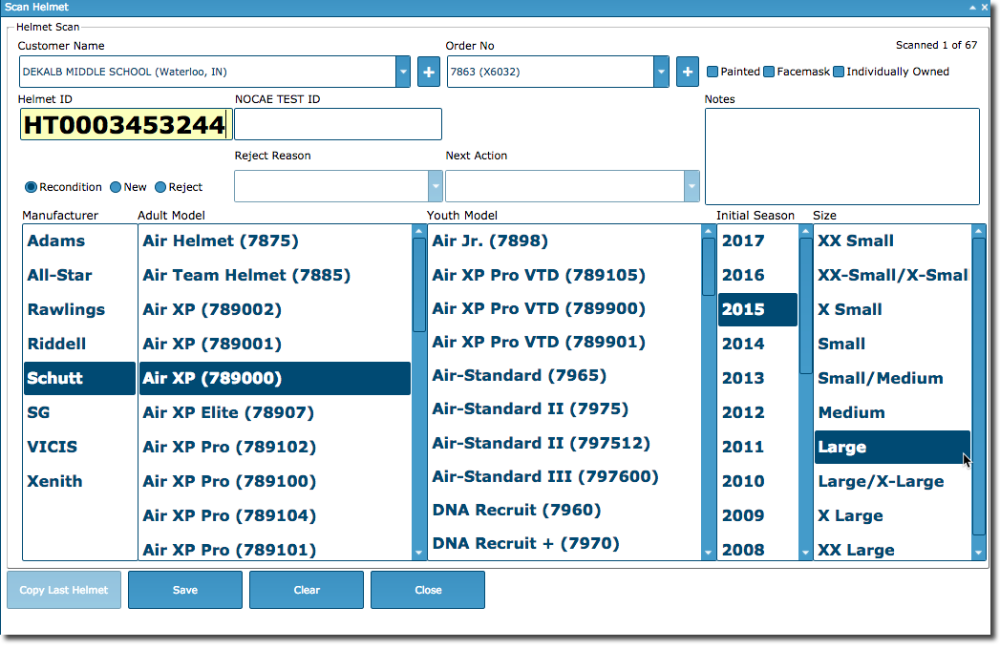
- Add customers and orders directly in the Scan Helmet screen. Click the [+] button when you want to add a customer or order. The [+] button should only display if you have the ability to add a customer and order.
- Change customers and orders directly in the Scan Helmet screen. You do not have to exit the screen, search and select a new customer and order. Begin by typing in the name. We display Customer Name (City, State).
- Painted, Facemask, and Individually Owned checkboxes are in the upper right.
- For Capitol Varsity and Continental, we removed the Helmet Ref field. (We can always turn it back on if needed.)
- The Initial Season will always start with the current year. When we reach October 1st of each year, we will begin displaying the next year as the Initial Season. This change will prevent having to add missing years. We will still maintain the manufacturer start and stop seasons for helmets in the database for reference purposes.